اربط برنامجك بأرض المتجر.
واجهة REST بسيطة لمزامنة المنتجات والأسعار، واستقبال الجرد، ودفع تحديثات فورية إلى أجهزة العرض.
POS / ERP
Servermanages the whole fleet
Overview
This document provides the technical specifications for integrating point-of-sale systems with izySCAN Server. izySCAN is a price display and stock management system that needs to stay synchronized with existing POS/point-of-sale systems.
🖥️ Starting the Web API Server
This section shows you how to create and start a simple web server on port 80 in various programming languages.
Creating a Basic Web Server
PHP - Built-in Server
// server.php
<?php
// Main route
if ($_SERVER['REQUEST_URI'] == '/') {
    header('Content-Type: application/json');
    echo json_encode(['status' => 'success', 'message' => 'Server running']);
    exit;
}

// Other routes return 404
http_response_code(404);
echo json_encode(['status' => 'error', 'message' => 'Route not found']);

// To start the server on port 80:
// sudo php -S 0.0.0.0:80 server.php
?>
Node.js - HTTP Server
// server.js
const http = require('http');

const server = http.createServer((req, res) => {
    res.setHeader('Content-Type', 'application/json');

    if (req.url === '/' && req.method === 'GET') {
        res.statusCode = 200;
        res.end(JSON.stringify({
            status: 'success',
            message: 'Server running'
        }));
    } else {
        res.statusCode = 404;
        res.end(JSON.stringify({
            status: 'error',
            message: 'Route not found'
        }));
    }
});

const PORT = 80;
server.listen(PORT, () => {
    console.log(`Server started on http://localhost:${PORT}`);
});

// To start: sudo node server.js
C# - Simple HTTP Server
// Program.cs
using System;
using System.Net;
using System.Text;
using System.Text.Json;

class Program
{
    static void Main()
    {
        HttpListener listener = new HttpListener();
        listener.Prefixes.Add("http://*:80/");
        listener.Start();

        Console.WriteLine("Server started on http://localhost:80");

        while (true)
        {
            HttpListenerContext context = listener.GetContext();
            HttpListenerResponse response = context.Response;

            response.ContentType = "application/json";

            string responseString;
            if (context.Request.Url.AbsolutePath == "/")
            {
                responseString = JsonSerializer.Serialize(new {
                    status = "success",
                    message = "Server running"
                });
                response.StatusCode = 200;
            }
            else
            {
                responseString = JsonSerializer.Serialize(new {
                    status = "error",
                    message = "Route not found"
                });
                response.StatusCode = 404;
            }

            byte[] buffer = Encoding.UTF8.GetBytes(responseString);
            response.ContentLength64 = buffer.Length;
            response.OutputStream.Write(buffer, 0, buffer.Length);
            response.Close();
        }
    }
}

// To compile and start:
// dotnet run (as administrator)
Java - HTTP Server
// SimpleServer.java
import com.sun.net.httpserver.*;
import java.io.*;
import java.net.InetSocketAddress;

public class SimpleServer {
    public static void main(String[] args) throws IOException {
        HttpServer server = HttpServer.create(new InetSocketAddress(80), 0);

        server.createContext("/", exchange -> {
            String response;
            int statusCode;

            if (exchange.getRequestURI().getPath().equals("/")) {
                response = "{\"status\":\"success\",\"message\":\"Server running\"}";
                statusCode = 200;
            } else {
                response = "{\"status\":\"error\",\"message\":\"Route not found\"}";
                statusCode = 404;
            }

            exchange.getResponseHeaders().set("Content-Type", "application/json");
            exchange.sendResponseHeaders(statusCode, response.length());

            OutputStream os = exchange.getResponseBody();
            os.write(response.getBytes());
            os.close();
        });

        server.start();
        System.out.println("Server started on http://localhost:80");
    }
}

// To compile and start:
// javac SimpleServer.java
// sudo java SimpleServer
Python - HTTP Server
# server.py
from http.server import HTTPServer, BaseHTTPRequestHandler
import json

class SimpleHandler(BaseHTTPRequestHandler):
    def do_GET(self):
        self.send_response(200 if self.path == '/' else 404)
        self.send_header('Content-Type', 'application/json')
        self.end_headers()

        if self.path == '/':
            response = {
                'status': 'success',
                'message': 'Server running'
            }
        else:
            response = {
                'status': 'error',
                'message': 'Route not found'
            }

        self.wfile.write(json.dumps(response).encode())

if __name__ == '__main__':
    server = HTTPServer(('', 80), SimpleHandler)
    print('Server started on http://localhost:80')
    server.serve_forever()

# To start: sudo python server.py
Delphi - HTTP Server with Indy
program SimpleWebServer;

{$APPTYPE CONSOLE}

uses
  System.SysUtils,
  IdHTTPServer,
  IdContext,
  IdCustomHTTPServer;

type
  TSimpleServer = class
    procedure HandleRequest(AContext: TIdContext;
      ARequestInfo: TIdHTTPRequestInfo;
      AResponseInfo: TIdHTTPResponseInfo);
  end;

procedure TSimpleServer.HandleRequest(AContext: TIdContext;
  ARequestInfo: TIdHTTPRequestInfo; AResponseInfo: TIdHTTPResponseInfo);
begin
  AResponseInfo.ContentType := 'application/json';

  if ARequestInfo.Document = '/' then
  begin
    AResponseInfo.ResponseNo := 200;
    AResponseInfo.ContentText := '{"status":"success","message":"Server running"}';
  end
  else
  begin
    AResponseInfo.ResponseNo := 404;
    AResponseInfo.ContentText := '{"status":"error","message":"Route not found"}';
  end;
end;

var
  Server: TIdHTTPServer;
  Handler: TSimpleServer;
begin
  Server := TIdHTTPServer.Create(nil);
  Handler := TSimpleServer.Create;
  try
    Server.DefaultPort := 80;
    Server.OnCommandGet := Handler.HandleRequest;
    Server.Active := True;

    WriteLn('Server started on http://localhost:80');
    WriteLn('Press Enter to stop...');
    ReadLn;
  finally
    Server.Free;
    Handler.Free;
  end;
end.
WinDev - Simple Web Server
// Main procedure
PROCEDURE DémarrerServeur()
    // Create a web server on port 80
    MonServeur est un httpServeur
    MonServeur..Port = 80
    MonServeur..RacineDocumentaire = fRepExe()

    // Add a route for "/"
    MonServeur..AjouteRoute("/", ProcédureAccueil)

    // Start the server
    SI MonServeur..Démarre() ALORS
        Info("Server started on http://localhost:80")
    SINON
        Erreur("Unable to start the server")
    FIN
FIN

// Procedure that handles the main route
PROCEDURE ProcédureAccueil(Requête est un httpRequête, Réponse est un httpRéponse)
    Réponse..TypeContenu = "application/json"
    Réponse..CodeStatut = 200

    vRéponse est un Variant
    vRéponse.status = "success"
    vRéponse.message = "Server running"

    Réponse..Contenu = VariantVersJSON(vRéponse)
FIN

// Call the procedure
DémarrerServeur()- Port 80 usually requires administrator/root privileges
- On Linux/Mac, use
sudoto start the server - On Windows, run as administrator
- To test: open
http://localhost/in your browser
🔐 Authentication
izySCAN supports three authentication methods (configurable per installation):
1. No Authentication
If the login and password fields are empty, requests are sent without authentication headers.
2. Token Authentication
If only the password field is set, it is treated as an access token:
Authorization: Bearer your_access_token_here3. Basic Authentication
If both the login and the password are provided:
Authorization: Basic base64(username:password)🏓 Ping Endpoint (Health Check)
Purpose: Test connectivity with the server
Health Check
This endpoint lets izySCAN verify that the server is reachable and responding correctly.
Response:
| Status | Description |
|---|---|
| 200 OK | The response body can be anything (it is not parsed by the client) |
📝 Code Examples
// PHP - GET /api/ping
public function ping() {
    return response()->json([
        'status' => 'ok',
        'message' => 'pong'
    ], 200);
}

// In routes/api.php
Route::get('/api/ping', 'ApiController@ping');
// Node.js - GET /api/ping
app.get('/api/ping', (req, res) => {
res.status(200).json({
status: 'ok',
message: 'pong'
});
});// C# - GET /api/ping
[HttpGet("ping")]
public IActionResult Ping()
{
return Ok(new
{
status = "ok",
message = "pong"
});
}// Java - GET /api/ping
@GetMapping("/api/ping")
public ResponseEntity ping() {
return ResponseEntity.ok(Map.of(
"status", "ok",
"message", "pong"
));
}# Python - GET /api/ping
@app.route('/api/ping', methods=['GET'])
def ping():
return jsonify({
'status': 'ok',
'message': 'pong'
}), 200// Delphi - GET /api/ping
procedure TSimpleServer.HandlePing(AContext: TIdContext;
ARequestInfo: TIdHTTPRequestInfo; AResponseInfo: TIdHTTPResponseInfo);
begin
AResponseInfo.ContentType := 'application/json';
AResponseInfo.ResponseNo := 200;
AResponseInfo.ContentText := '{"status":"ok","message":"pong"}';
end;// WinDev - GET /api/ping
PROCEDURE ProcédurePing(Requête est un httpRequête, Réponse est un httpRéponse)
Réponse..TypeContenu = "application/json"
Réponse..CodeStatut = 200
vRéponse est un Variant
vRéponse.status = "ok"
vRéponse.message = "pong"
Réponse..Contenu = VariantVersJSON(vRéponse)
FIN📦 Product Endpoints
All endpoints must accept JSON content and return JSON responses.
Content-Type: application/json and Accept: application/json
Product Synchronization
Purpose: Retrieve products for synchronization with izySCAN
Query Parameters:
| Parameter | Type | Required | Description |
|---|---|---|---|
updated_since |
string (ISO 8601) | Optional | For incremental synchronization (e.g. 2024-01-15 10:30:00). Returns only products created or modified after this date. |
limit |
integer | Optional | Maximum number of products per request (the client requests 2000) |
offset |
integer | Optional | Number of products to skip (for pagination, default: 0) |
Example Request:
GET /api/products?updated_since=2024-01-15 10:30:00&limit=2000&offset=0Response:
{
  "data": [
    {
      "id": 123,
      "name": "Product Name",
      "barcode": "1234567890123",
      "price": 29.99,
      "promo_price": 25.99,
      "server_id": 123
    }
  ],
  "pagination": {
    "total": 15000,
    "offset": 0,
    "limit": 2000,
    "has_more": true
  }
}
Product Object Fields:
| Field | Type | Required | Description |
|---|---|---|---|
id |
string/number | Required | Unique product identifier (may be identical to the barcode) |
name |
string | Required | Product display name |
barcode |
string | Required | Product barcode (EAN-13, UPC, etc. — from the next release, a 12-digit UPC-A and the EAN-13 made of the same digits with a leading 0 identify the same product: the server recognises both spellings and stores a new 12-digit code in its 13-digit form). Products without a barcode are ignored. |
price |
number | Required | Current selling price |
promo_price |
number | Optional | Promotional price (if applicable) |
server_id |
string/number | Optional | Server-side product ID (used for price updates) |
Pagination Object Fields:
| Field | Type | Required | Description |
|---|---|---|---|
total |
integer | Recommended | Total number of products matching the query |
offset |
integer | Recommended | Current offset |
limit |
integer | Recommended | Requested limit |
has_more |
boolean | Recommended | true if more products are available, false otherwise |
- If pagination is not provided, the client falls back to batch-size detection
- Products with an empty or missing barcode are ignored by the client
- The client fetches in batches of 2000 until
has_moreisfalse
📝 Code Examples
// PHP - GET /api/products
public function getProducts(Request $request) {
    $updatedSince = $request->query('updated_since');
    $limit = min($request->query('limit', 2000), 2000);
    $offset = $request->query('offset', 0);

    $query = Product::where('barcode', '!=', null)
                    ->where('barcode', '!=', '');

    if ($updatedSince) {
        $query->where('updated_at', '>=', $updatedSince);
    }

    $total = $query->count();
    $products = $query->offset($offset)->limit($limit)->get();

    return response()->json([
        'data' => $products->map(function($product) {
            return [
                'id' => $product->id,
                'name' => $product->name,
                'barcode' => $product->barcode,
                'price' => (float) $product->price,
                'promo_price' => $product->promo_price ? (float) $product->promo_price : null,
                'server_id' => $product->id,
            ];
        }),
        'pagination' => [
            'total' => $total,
            'offset' => $offset,
            'limit' => $limit,
            'has_more' => ($offset + $limit) < $total,
        ]
    ]);
}
// Node.js - GET /api/products
app.get('/api/products', async (req, res) => {
const { updated_since, limit = 2000, offset = 0 } = req.query;
let query = db.products.find({
barcode: { $ne: null, $ne: '' }
});
if (updated_since) {
query = query.where('updated_at').gte(new Date(updated_since));
}
const total = await db.products.countDocuments({
barcode: { $ne: null, $ne: '' }
});
const products = await query
.skip(parseInt(offset))
.limit(Math.min(parseInt(limit), 2000))
.exec();
res.json({
data: products.map(product => ({
id: product._id,
name: product.name,
barcode: product.barcode,
price: parseFloat(product.price),
promo_price: product.promo_price ? parseFloat(product.promo_price) : null,
server_id: product._id,
})),
pagination: {
total,
offset: parseInt(offset),
limit: parseInt(limit),
has_more: (parseInt(offset) + parseInt(limit)) < total,
}
});
});// C# - GET /api/products
[HttpGet("products")]
public async Task GetProducts(
[FromQuery] DateTime? updatedSince,
[FromQuery] int limit = 2000,
[FromQuery] int offset = 0)
{
limit = Math.Min(limit, 2000);
var query = _context.Products
.Where(p => p.Barcode != null && p.Barcode != "");
if (updatedSince.HasValue)
{
query = query.Where(p => p.UpdatedAt >= updatedSince.Value);
}
var total = await query.CountAsync();
var products = await query
.Skip(offset)
.Take(limit)
.Select(p => new
{
id = p.Id,
name = p.Name,
barcode = p.Barcode,
price = p.Price,
promo_price = (decimal?)p.PromoPrice,
server_id = p.Id
})
.ToListAsync();
return Ok(new
{
data = products,
pagination = new
{
total,
offset,
limit,
has_more = (offset + limit) < total
}
});
} // Java - GET /api/products
@GetMapping("/api/products")
public ResponseEntity getProducts(
@RequestParam(required = false) String updatedSince,
@RequestParam(defaultValue = "2000") int limit,
@RequestParam(defaultValue = "0") int offset) {
limit = Math.min(limit, 2000);
Specification spec = (root, query, cb) ->
cb.and(
cb.isNotNull(root.get("barcode")),
cb.notEqual(root.get("barcode"), "")
);
if (updatedSince != null) {
LocalDateTime date = LocalDateTime.parse(updatedSince);
spec = spec.and((root, query, cb) ->
cb.greaterThanOrEqualTo(root.get("updatedAt"), date));
}
long total = productRepository.count(spec);
Pageable pageable = PageRequest.of(offset / limit, limit);
Page page = productRepository.findAll(spec, pageable);
List> products = page.getContent().stream()
.map(p -> Map.of(
"id", p.getId(),
"name", p.getName(),
"barcode", p.getBarcode(),
"price", p.getPrice(),
"promo_price", p.getPromoPrice(),
"server_id", p.getId()
))
.collect(Collectors.toList());
return ResponseEntity.ok(Map.of(
"data", products,
"pagination", Map.of(
"total", total,
"offset", offset,
"limit", limit,
"has_more", offset + limit < total
)
));
} # Python - GET /api/products
from flask import Flask, request, jsonify
from datetime import datetime
@app.route('/api/products', methods=['GET'])
def get_products():
updated_since = request.args.get('updated_since')
limit = min(int(request.args.get('limit', 2000)), 2000)
offset = int(request.args.get('offset', 0))
query = Product.query.filter(
Product.barcode.isnot(None),
Product.barcode != ''
)
if updated_since:
date = datetime.fromisoformat(updated_since.replace('Z', '+00:00'))
query = query.filter(Product.updated_at >= date)
total = query.count()
products = query.offset(offset).limit(limit).all()
return jsonify({
'data': [{
'id': p.id,
'name': p.name,
'barcode': p.barcode,
'price': float(p.price),
'promo_price': float(p.promo_price) if p.promo_price else None,
'server_id': p.id
} for p in products],
'pagination': {
'total': total,
'offset': offset,
'limit': limit,
'has_more': (offset + limit) < total
}
})// Delphi - GET /api/products
procedure GetProducts(const UpdatedSince: string; Limit, Offset: Integer);
var
HttpClient: TNetHTTPClient;
Response: IHTTPResponse;
URL: string;
JSONResponse: TJSONObject;
Products: TJSONArray;
begin
HttpClient := TNetHTTPClient.Create(nil);
try
URL := Format('https://api.example.com/api/products?limit=%d&offset=%d',
[Limit, Offset]);
if UpdatedSince <> '' then
URL := URL + '&updated_since=' + UpdatedSince;
HttpClient.Accept := 'application/json';
Response := HttpClient.Get(URL);
if Response.StatusCode = 200 then
begin
JSONResponse := TJSONObject.ParseJSONValue(Response.ContentAsString) as TJSONObject;
try
if JSONResponse.GetValue('status').Value = 'success' then
begin
Products := JSONResponse.GetValue('data');
// Process the products...
end;
finally
JSONResponse.Free;
end;
end;
finally
HttpClient.Free;
end;
end; // WinDev - GET /api/products
PROCEDURE RécupérerProduits(dtDepuisMiseAJour est un DateHeure = "", nLimite est un entier = 2000, nOffset est un entier = 0)
tabProduits est un tableau de STProduct
sURL = gsURLAPI + "/api/products?"
sURL += "limit=" + nLimite
sURL += "&offset=" + nOffset
SI dtDepuisMiseAJour <> "" ALORS
sURL += "&updated_since=" + DateHeureVersISO8601(dtDepuisMiseAJour)
FIN
requeteHTTP est un httpRequête
requeteHTTP.URL = sURL
requeteHTTP.Méthode = httpGet
tabEntetes est un tableau associatif de chaînes = ObtenirEntetes()
POUR TOUT sValeur, sCle DE tabEntetes
requeteHTTP.Entête[sCle] = sValeur
FIN
réponseHTTP est un httpRéponse = HTTPEnvoie(requeteHTTP)
SI réponseHTTP.CodeEtat = 200 ALORS
vJSON est un Variant = JSONVersVariant(réponseHTTP.Contenu)
POUR TOUT vProduit DE vJSON.data
stProduit est un STProduct
stProduit.id = vProduit.id
stProduit.name = vProduit.name
stProduit.barcode = vProduit.barcode
stProduit.price = vProduit.price
stProduit.promo_price = vProduit.promo_price
stProduit.server_id = vProduit.server_id
Ajoute(tabProduits, stProduit)
FIN
FIN
RENVOYER tabProduits
FINPrice Update
Purpose: Update a product's price from izySCAN
URL Parameters:
barcode: Product barcode
Request Body:
{
  "barcode": "1234567890123",
  "price": 32.99,
  "server_id": 123
}
Response:
{
  "status": "success",
  "message": "Price updated successfully",
  "data": {
    "server_id": 123,
    "barcode": "1234567890123",
    "old_price": 29.99,
    "new_price": 32.99,
    "updated_at": "2025-07-16T15:30:00Z"
  }
}
📝 Code Examples
// PHP - PUT or POST /api/products/{barcode}/price
public function updatePrice(Request $request, $barcode) {
    $validated = $request->validate([
        'price' => 'required|numeric|min:0',
        'server_id' => 'required|integer'
    ]);

    $product = Product::where('barcode', $barcode)->first();

    if (!$product) {
        return response()->json([
            'status' => 'error',
            'error_code' => 'PRODUCT_NOT_FOUND',
            'message' => 'Product not found'
        ], 404);
    }

    $oldPrice = $product->price;
    $product->price = $validated['price'];
    $product->save();

    return response()->json([
        'status' => 'success',
        'message' => 'Price updated successfully',
        'data' => [
            'server_id' => $product->id,
            'barcode' => $product->barcode,
            'old_price' => (float) $oldPrice,
            'new_price' => (float) $product->price,
            'updated_at' => $product->updated_at->toISOString(),
        ]
    ]);
}

// In routes/api.php
Route::match(['PUT', 'POST'], '/api/products/{barcode}/price', 'ProductController@updatePrice');
// Node.js - PUT or POST /api/products/:barcode/price
app.put('/api/products/:barcode/price', updatePrice);
app.post('/api/products/:barcode/price', updatePrice);
async function updatePrice(req, res) {
const { barcode } = req.params;
const { price, server_id } = req.body;
if (!price || price < 0) {
return res.status(400).json({
status: 'error',
error_code: 'INVALID_PRICE',
message: 'Price must be a positive number'
});
}
const product = await db.products.findOne({ barcode });
if (!product) {
return res.status(404).json({
status: 'error',
error_code: 'PRODUCT_NOT_FOUND',
message: 'Product not found'
});
}
const oldPrice = product.price;
product.price = price;
product.updated_at = new Date();
await product.save();
res.json({
status: 'success',
message: 'Price updated successfully',
data: {
server_id: product._id,
barcode: product.barcode,
old_price: parseFloat(oldPrice),
new_price: parseFloat(price),
updated_at: product.updated_at.toISOString(),
}
});
}// C# - PUT or POST /api/products/{barcode}/price
[HttpPut("products/{barcode}/price")]
[HttpPost("products/{barcode}/price")]
public async Task UpdatePrice(
string barcode,
[FromBody] PriceUpdateRequest request)
{
if (request.Price < 0)
{
return BadRequest(new ErrorResponse
{
ErrorCode = "INVALID_PRICE",
Message = "Price must be a positive number"
});
}
var product = await _context.Products
.FirstOrDefaultAsync(p => p.Barcode == barcode);
if (product == null)
{
return NotFound(new ErrorResponse
{
ErrorCode = "PRODUCT_NOT_FOUND",
Message = "Product not found"
});
}
var oldPrice = product.Price;
product.Price = request.Price;
product.UpdatedAt = DateTime.UtcNow;
await _context.SaveChangesAsync();
return Ok(new
{
status = "success",
message = "Price updated successfully",
data = new
{
server_id = product.Id,
barcode = product.Barcode,
old_price = oldPrice,
new_price = product.Price,
updated_at = product.UpdatedAt.ToString("yyyy-MM-dd'T'HH:mm:ss'Z'")
}
});
} // Java - PUT or POST /api/products/{barcode}/price
@PutMapping("/api/products/{barcode}/price")
@PostMapping("/api/products/{barcode}/price")
public ResponseEntity updatePrice(
@PathVariable String barcode,
@RequestBody PriceUpdateRequest request) {
if (request.getPrice().compareTo(BigDecimal.ZERO) < 0) {
return ResponseEntity.badRequest().body(Map.of(
"status", "error",
"error_code", "INVALID_PRICE",
"message", "Price must be a positive number"
));
}
Optional productOpt = productRepository.findByBarcode(barcode);
if (productOpt.isEmpty()) {
return ResponseEntity.status(404).body(Map.of(
"status", "error",
"error_code", "PRODUCT_NOT_FOUND",
"message", "Product not found"
));
}
Product product = productOpt.get();
BigDecimal oldPrice = product.getPrice();
product.setPrice(request.getPrice());
product.setUpdatedAt(LocalDateTime.now());
productRepository.save(product);
return ResponseEntity.ok(Map.of(
"status", "success",
"message", "Price updated successfully",
"data", Map.of(
"server_id", product.getId(),
"barcode", product.getBarcode(),
"old_price", oldPrice,
"new_price", product.getPrice(),
"updated_at", product.getUpdatedAt().toString()
)
));
} # Python - PUT or POST /api/products/{barcode}/price
@app.route('/api/products//price', methods=['PUT', 'POST'])
def update_price(barcode):
data = request.get_json()
if 'price' not in data or data['price'] < 0:
return jsonify({
'status': 'error',
'error_code': 'INVALID_PRICE',
'message': 'Price must be a positive number'
}), 400
product = Product.query.filter_by(barcode=barcode).first()
if not product:
return jsonify({
'status': 'error',
'error_code': 'PRODUCT_NOT_FOUND',
'message': 'Product not found'
}), 404
old_price = product.price
product.price = data['price']
product.updated_at = datetime.utcnow()
db.session.commit()
return jsonify({
'status': 'success',
'message': 'Price updated successfully',
'data': {
'server_id': product.id,
'barcode': product.barcode,
'old_price': float(old_price),
'new_price': float(product.price),
'updated_at': product.updated_at.isoformat() + 'Z'
}
}) // Delphi - PUT or POST /api/products/{barcode}/price
procedure UpdatePrice(const Barcode: string; NewPrice: Currency; ServerID: Integer);
var
HttpClient: TNetHTTPClient;
Response: IHTTPResponse;
RequestBody: TJSONObject;
ResponseJSON: TJSONObject;
begin
HttpClient := TNetHTTPClient.Create(nil);
try
RequestBody := TJSONObject.Create;
try
RequestBody.AddPair('barcode', Barcode);
RequestBody.AddPair('price', TJSONNumber.Create(NewPrice));
RequestBody.AddPair('server_id', TJSONNumber.Create(ServerID));
HttpClient.ContentType := 'application/json';
HttpClient.Accept := 'application/json';
Response := HttpClient.Put(
Format('https://api.example.com/api/products/%s/price', [Barcode]),
TStringStream.Create(RequestBody.ToString, TEncoding.UTF8)
);
if Response.StatusCode = 200 then
begin
ResponseJSON := TJSONObject.ParseJSONValue(Response.ContentAsString) as TJSONObject;
try
ShowMessage('Price updated successfully');
finally
ResponseJSON.Free;
end;
end;
finally
RequestBody.Free;
end;
finally
HttpClient.Free;
end;
end;// WinDev - PUT or POST /api/products/{barcode}/price
PROCEDURE MettreAJourPrix(sBarcode est une chaîne, mNouveauPrix est un monétaire, nServerID est un entier) : booléen
vRequete est un Variant
vRequete.barcode = sBarcode
vRequete.price = mNouveauPrix
vRequete.server_id = nServerID
sJSONRequete = VariantVersJSON(vRequete)
requeteHTTP est un httpRequête
requeteHTTP.URL = gsURLAPI + "/api/products/" + sBarcode + "/price"
requeteHTTP.Méthode = httpPut // or httpPost
requeteHTTP.Contenu = sJSONRequete
tabEntetes est un tableau associatif de chaînes = ObtenirEntetes()
POUR TOUT sValeur, sCle DE tabEntetes
requeteHTTP.Entête[sCle] = sValeur
FIN
réponseHTTP est un httpRéponse = HTTPEnvoie(requeteHTTP)
SI réponseHTTP.CodeEtat = 200 ALORS
vRéponse est un Variant = JSONVersVariant(réponseHTTP.Contenu)
SI vRéponse.status = "success" ALORS
Info("Price updated", "Old: " + vRéponse.data.old_price, "New: " + vRéponse.data.new_price)
RENVOYER Vrai
FIN
FIN
RENVOYER Faux
FIN⚡ Push API — Real-Time Price Updates
This endpoint lets point-of-sale (POS) systems send price changes directly to the izySCAN server, so that price displays reflect changes immediately instead of waiting for the periodic sync.
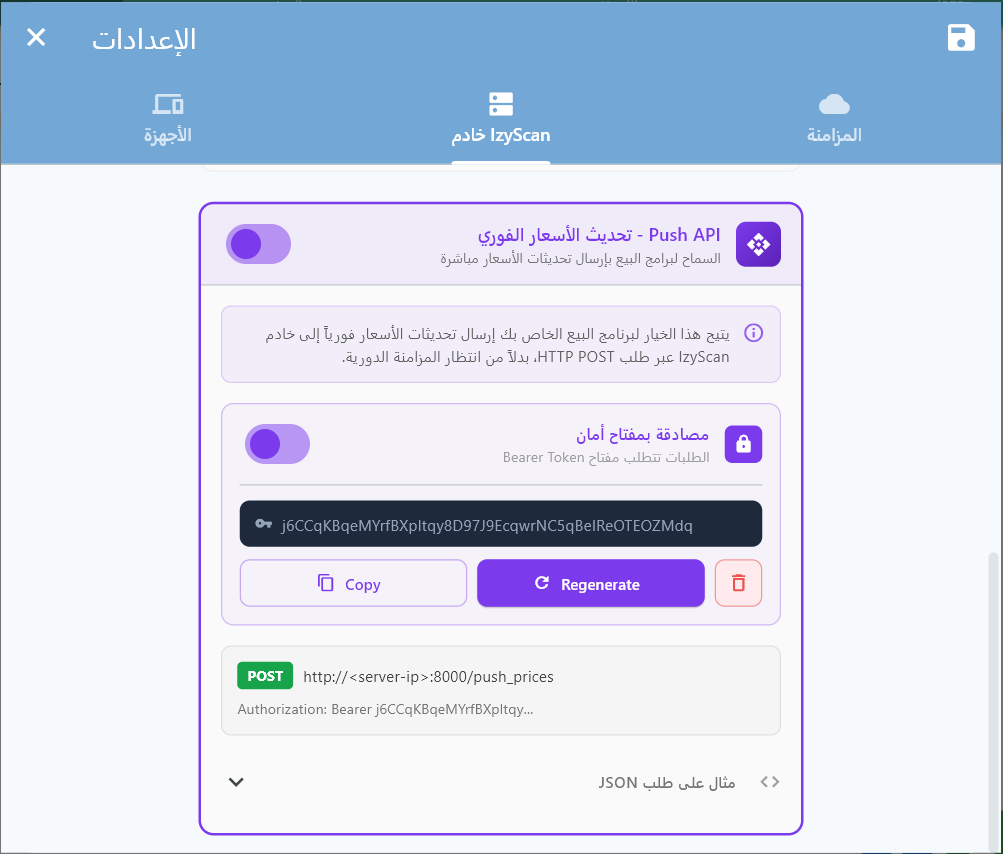
izySCAN Server Settings — Push API section with token authentication
Before you can use this endpoint, you must enable the Push API in the izySCAN server settings:
🔑 Note on the token: If authentication is enabled, click “إنشاء مفتاح أمان” to generate a token, then use the “Copy” button to copy it. Give this token to the POS software developer so they include it in the Authorization: Bearer <token> header of their API requests.
A misconfigured integration can push completely wrong prices to every price display and to the izySCAN app, for the entire catalog. Read the rules below carefully before your first push.
1. Price unit — never cents, never a scaling factor
The price, promo_price and p_price fields must always be expressed in the store's main currency unit (for example dinars, e.g. 120.00). Never multiply the price by 100 (cents), by 1,000,000, or by any other factor before sending it.
✅ Correct — product priced at 120.00 DZD
{
  "barcode": "6130001234567",
  "price": 120.00
}
❌ Incorrect — price multiplied by 1,000,000
{
  "barcode": "6130001234567",
  "price": 120000000.00
}"price": 120000000.00 for a product priced at 120.00 DZD on the shelf). Result: every price display and the izySCAN app showed a wrong price in production until it was corrected manually.
2. promo_price — never a copy of price
promo_price is the discounted price shown during a promotion. It must be 0 when the product is not on promotion. Never copy the value of price into promo_price: a promo_price equal to price makes the product appear permanently on promotion on every price display.
✅ Correct — no promotion running
{
  "price": 120.00,
  "promo_price": 0
}
❌ Incorrect — promo_price duplicated from price
{
  "price": 120.00,
  "promo_price": 120.00
}
3. Accepted types and decimal format
A JSON number (120.00) is the preferred format. A numeric string ("120.00") is accepted for compatibility but discouraged. The decimal separator is always a period (.) — never a comma (,) and never a thousands separator.
4. Always verify after a first bulk push
After an initial full sync (or any bulk push), call GET /get?barcode=<a_code> on a few random products and compare the returned price field with the price actually displayed on the shelf. This simple check would have caught the incident above immediately, before it affected all 11,846 products in the catalog.
Send Price Updates
Purpose: Push one or more price changes to izySCAN for an instant update on the price displays
Headers:
| Header | Value | Required |
|---|---|---|
Content-Type |
application/json |
Yes |
Authorization |
Bearer <your_token> |
Only if a token is configured |
Request Body — Single product:
{
  "barcode": "6281001210016",
  "name": "Product name",
  "price": 12.50,
  "promo_price": 9.90
}
Request Body — Multiple products:
{
  "products": [
    {
      "barcode": "6281001210016",
      "name": "Lait Entier 1L",
      "price": 12.50,
      "promo_price": 9.90
    },
    {
      "barcode": "5449000000996",
      "name": "Coca-Cola 330ml",
      "price": 3.250,
      "promo_price": 0
    }
  ]
}
Product Fields:
| Field | Type | Required | Description |
|---|---|---|---|
barcode |
string | Yes | Unique product barcode (EAN-13, UPC, etc. — from the next release, a 12-digit UPC-A and the EAN-13 made of the same digits with a leading 0 identify the same product: the server recognises both spellings and stores a new 12-digit code in its 13-digit form) |
name |
string | Yes* | Product name. *Required only if the product does not yet exist in izySCAN |
price |
number | Yes | Current selling price (≥ 0) |
promo_price |
number | No | Promotional price. If 0 or equal to price → no promotion |
Response — All products processed successfully (200):
{
  "status": "success",
  "total": 1500,
  "updated": 1350,
  "created": 150,
  "failed": 0
}
Response — With partial errors (200):
Processing never stops at the first error. All valid products are saved, and only the failed barcodes are listed in failed_items.
{
  "status": "success",
  "total": 1500,
  "updated": 1347,
  "created": 148,
  "failed": 5,
  "failed_items": [
    { "barcode": "999000111", "reason": "MISSING_NAME" },
    { "barcode": "888000222", "reason": "INVALID_PRICE" },
    { "barcode": "?", "reason": "MISSING_BARCODE" }
  ]
}
Per-product error codes (reason):
| Code | Description |
|---|---|
MISSING_BARCODE | The barcode field is missing or empty |
MISSING_PRICE | The price field is missing |
INVALID_PRICE | The price is not a valid number or is negative |
MISSING_NAME | A name is required for a new product (one that does not exist in izySCAN) |
INVALID_ITEM | The item is not a valid JSON object |
WRITE_ERROR | Error writing to the local database |
HTTP Error Responses:
| HTTP Code | Error | Description |
|---|---|---|
| 401 | UNAUTHORIZED |
Invalid or missing authentication token |
| 405 | METHOD_NOT_ALLOWED |
Only the POST method is accepted |
| 400 | INVALID_JSON |
The request body is not valid JSON |
| 400 | EMPTY_BODY |
The request body is empty |
| 400 | BATCH_TOO_LARGE |
More than 5,000 products sent — paginate your requests |
| 503 | PUSH_API_DISABLED |
The Push API is not enabled in the settings |
📝 Integration Examples
// PHP — Send a price change to izySCAN
function pushPriceUpdate($izyscanHost, $port, $token, $products) {
    $url = "http://{$izyscanHost}:{$port}/push_prices";

    $headers = ['Content-Type: application/json'];
    if (!empty($token)) {
        $headers[] = "Authorization: Bearer {$token}";
    }

    $data = json_encode(['products' => $products]);

    $ch = curl_init($url);
    curl_setopt($ch, CURLOPT_POST, true);
    curl_setopt($ch, CURLOPT_POSTFIELDS, $data);
    curl_setopt($ch, CURLOPT_HTTPHEADER, $headers);
    curl_setopt($ch, CURLOPT_RETURNTRANSFER, true);
    curl_setopt($ch, CURLOPT_TIMEOUT, 10);

    $response = curl_exec($ch);
    $httpCode = curl_getinfo($ch, CURLINFO_HTTP_CODE);
    curl_close($ch);

    return ['status' => $httpCode, 'body' => json_decode($response, true)];
}

// Usage — whenever a price changes in your software
$result = pushPriceUpdate('192.168.1.100', 8000, 'your_token', [
    [
        'barcode'     => '6281001210016',
        'name'        => 'Lait Entier 1L',
        'price'       => 12.50,
        'promo_price' => 9.90,
    ],
]);
// Node.js — Send a price change to izySCAN
async function pushPriceUpdate(izyscanHost, port, token, products) {
const url = `http://${izyscanHost}:${port}/push_prices`;
const headers = { 'Content-Type': 'application/json' };
if (token) {
headers['Authorization'] = `Bearer ${token}`;
}
const response = await fetch(url, {
method: 'POST',
headers,
body: JSON.stringify({ products }),
});
return await response.json();
}
// Usage — Call this function on every price change
const result = await pushPriceUpdate('192.168.1.100', 8000, 'your_token', [
{
barcode: '6281001210016',
name: 'Lait Entier 1L',
price: 12.50,
promo_price: 9.90,
},
]);
console.log(`Result: ${result.updated} updated, ${result.created} created`);// C# — Send a price change to izySCAN
public async Task<string> PushPriceUpdate(
string izyscanHost, int port, string token, object[] products)
{
using var client = new HttpClient();
client.Timeout = TimeSpan.FromSeconds(10);
if (!string.IsNullOrEmpty(token))
client.DefaultRequestHeaders.Authorization =
new System.Net.Http.Headers.AuthenticationHeaderValue("Bearer", token);
var payload = new { products };
var json = System.Text.Json.JsonSerializer.Serialize(payload);
var content = new StringContent(json, Encoding.UTF8, "application/json");
var response = await client.PostAsync(
$"http://{izyscanHost}:{port}/push_prices", content);
return await response.Content.ReadAsStringAsync();
}
// Usage — in your price-change event handler
var result = await PushPriceUpdate("192.168.1.100", 8000, "your_token",
new object[] {
new { barcode = "6281001210016", name = "Lait Entier 1L",
price = 12.50, promo_price = 9.90 }
});// Java — Send a price change to izySCAN
import java.net.http.*;
import java.net.URI;
public String pushPriceUpdate(
String host, int port, String token, String jsonProducts)
throws Exception {
HttpClient client = HttpClient.newBuilder()
.connectTimeout(Duration.ofSeconds(10))
.build();
HttpRequest.Builder builder = HttpRequest.newBuilder()
.uri(URI.create("http://" + host + ":" + port + "/push_prices"))
.header("Content-Type", "application/json")
.POST(HttpRequest.BodyPublishers.ofString(jsonProducts));
if (token != null && !token.isEmpty()) {
builder.header("Authorization", "Bearer " + token);
}
HttpResponse<String> response =
client.send(builder.build(), HttpResponse.BodyHandlers.ofString());
return response.body();
}
// Usage
String json = "{\"products\":[{\"barcode\":\"6281001210016\","
+ "\"name\":\"Lait Entier 1L\",\"price\":12.5,\"promo_price\":9.9}]}";
String result = pushPriceUpdate("192.168.1.100", 8000, "your_token", json);# Python — Send a price change to izySCAN
import requests
def push_price_update(izyscan_host, port, token, products):
url = f"http://{izyscan_host}:{port}/push_prices"
headers = {"Content-Type": "application/json"}
if token:
headers["Authorization"] = f"Bearer {token}"
response = requests.post(
url,
json={"products": products},
headers=headers,
timeout=10,
)
response.raise_for_status()
return response.json()
# Usage — call on every price change in your system
result = push_price_update("192.168.1.100", 8000, "your_token", [
{
"barcode": "6281001210016",
"name": "Lait Entier 1L",
"price": 12.50,
"promo_price": 9.90,
},
])
print(f"Updated: {result['updated']}, Created: {result['created']}")// Delphi — Send a price change to izySCAN
uses System.Net.HttpClient, System.JSON;
function PushPriceUpdate(const AIzyScanHost: string; APort: Integer;
const AToken: string; AProducts: TJSONArray): TJSONObject;
var
LClient: THTTPClient;
LResponse: IHTTPResponse;
LPayload: TJSONObject;
LContent: TStringStream;
begin
LClient := THTTPClient.Create;
try
LClient.ConnectionTimeout := 10000;
LClient.ContentType := 'application/json';
if AToken <> '' then
LClient.CustomHeaders['Authorization'] := 'Bearer ' + AToken;
LPayload := TJSONObject.Create;
LPayload.AddPair('products', AProducts);
LContent := TStringStream.Create(LPayload.ToJSON, TEncoding.UTF8);
try
LResponse := LClient.Post(
Format('http://%s:%d/push_prices', [AIzyScanHost, APort]),
LContent);
Result := TJSONObject.ParseJSONValue(
LResponse.ContentAsString) as TJSONObject;
finally
LContent.Free;
LPayload.Free;
end;
finally
LClient.Free;
end;
end;
// Usage
var Products := TJSONArray.Create;
var Product := TJSONObject.Create;
Product.AddPair('barcode', '6281001210016');
Product.AddPair('name', 'Lait Entier 1L');
Product.AddPair('price', TJSONNumber.Create(12.50));
Product.AddPair('promo_price', TJSONNumber.Create(9.90));
Products.Add(Product);
var Result := PushPriceUpdate('192.168.1.100', 8000, 'your_token', Products);// WinDev — Send a price change to izySCAN
PROCÉDURE PushPriceUpdate(sHôte est une chaîne,
nPort est un entier, sToken est une chaîne,
tabProduits est un tableau de STProductPush)
sURL est une chaîne = ChaîneConstruit(
"http://%1:%2/push_prices", sHôte, nPort)
// Build the JSON
vPayload est un Variant
vPayload.products = tabProduits
sJSON est une chaîne = VariantVersJSON(vPayload)
// Prepare the request
cRequête est un httpRequête
cRequête.URL = sURL
cRequête.Méthode = httpPost
cRequête.ContentType = "application/json"
cRequête.Contenu = sJSON
cRequête.Timeout = 10s
SI sToken <> "" ALORS
cRequête.Entête["Authorization"] = "Bearer " + sToken
FIN
// Send
cRéponse est un httpRéponse = HTTPEnvoie(cRequête)
SI cRéponse.CodeEtat = 200 ALORS
Info("Prices updated successfully")
SINON
Erreur("Failed: " + cRéponse.Contenu)
FIN
FIN
// Usage — call whenever a price is changed
stProduit est un STProductPush
stProduit.barcode = "6281001210016"
stProduit.name = "Lait Entier 1L"
stProduit.price = 12.50
stProduit.promo_price = 9.90
tabProduits est un tableau de STProductPush
Ajoute(tabProduits, stProduit)
PushPriceUpdate("192.168.1.100", 8000, "your_token", tabProduits)📘 Integration Best Practices
1. Real-time updates (main use case)
Call this endpoint immediately after every price change in your POS software. This is the main purpose of the Push API — ensuring the price displays show the correct price within seconds.
2. Full sync — Pagination required
This endpoint can also be used for a full sync that sends your entire catalog. The server enforces a limit of 5,000 products per request. Above that, you receive the BATCH_TOO_LARGE error.
For a catalog of 50,000 products, split it into batches:
// Pseudo-code — Paginated full sync

BATCH_SIZE = 5000
allProducts = getAllProductsFromPOS()
totalBatches = ceil(allProducts.length / BATCH_SIZE)

// Send each batch sequentially
for i = 0 to totalBatches - 1:
    batch = allProducts[i * BATCH_SIZE .. (i+1) * BATCH_SIZE]

    response = HTTP_POST("/push_prices", { "products": batch })

    if response.status == "success":
        print("Batch " + (i+1) + "/" + totalBatches +
              " — " + response.updated + " updated, " +
              response.created + " created")
    else:
        print("Batch error " + (i+1) + ": " + response.error)
        // Retry this batch or continue, depending on your logic

    // Optional pause between batches (100-500ms)
sleep(200ms)| Catalog size | Batches (5,000/batch) | Estimated time |
|---|---|---|
| 5,000 products | 1 request | ~2s |
| 20,000 products | 4 requests | ~10s |
| 100,000 products | 20 requests | ~45s |
3. General rules
- Retry on network failure — The izySCAN server may be temporarily unreachable. Retry 2-3 times with an increasing delay (1s, 3s, 5s).
- Token in configuration — Store the token in your software's configuration, never hard-coded in the source code.
- Automatic promo handling — From version 1.14.0 on, if
promo_priceis0or ≥price, the promotion is ignored (the product is shown without a promotion). On earlier versions, do not rely on this: send0when there is no promotion (see the box above). - Name optional for updates — The
namefield is required only for new products. For a price update,barcode+priceare enough. - No need to deduplicate — If you send the same barcode twice in a batch, the last price wins.
📥 Webhook — Price Change Notification (izySCAN → POS)
This endpoint is the mirror image of the Push API described above, but in the opposite direction. The Push API is used to send prices from your point-of-sale system to izySCAN. This webhook, on the other hand, is used to receive in your point-of-sale system the price changes made from izySCAN.
izySCAN now lets a store employee change a selling price or a purchase price directly on a PDA terminal (after entering an administrator PIN) or in the izySCAN desktop application. However, for the selling price, izySCAN is not the system of record — your POS database is. Without this webhook, the next sync from your POS silently overwrites the change made by the employee, which is then lost.
This section describes a specification published in advance so that POS software vendors can build and test their receiving endpoint. izySCAN does not make these calls yet.
📌 What happens in the meantime? In stores synchronized from a POS database, a selling price change made on a PDA or in the izySCAN desktop application is overwritten by the next sync from the POS. Purchase price changes (p_price), on the other hand, are not affected: izySCAN stores them itself and they survive the sync.
Receiving a Price Change Notification
Purpose: Let your point-of-sale system receive, in near real time, price changes made directly in izySCAN (PDA or desktop application), so that you can apply them to your database before a sync overwrites them.
Headers sent by izySCAN:
| Header | Value | Required |
|---|---|---|
Content-Type |
application/json |
Yes |
Authorization |
Bearer <token> |
Only if a token is configured for this store in izySCAN |
Request Body Sent by izySCAN:
{
  "event": "price_changed",
  "store": "<store name>",
  "changed_at": "2026-07-17T09:00:00.000Z",
  "source": "pda",
  "device_id": "1CDBD49B2778",
  "products": [
    {
      "barcode": "6130001234567",
      "name": "Lait 1L",
      "price": 120.00,
      "promo_price": 0,
      "p_price": 95.00,
      "old_p_price": 90.00
    }
  ]
}
Request Fields:
| Field | Type | Required | Description |
|---|---|---|---|
event |
string | Yes | Always "price_changed" |
store |
string | Yes | Name of the izySCAN store concerned, as configured on the izySCAN side |
changed_at |
string (ISO 8601) | Yes | Date and time of the change, in UTC |
source |
string | Yes | "pda" (change made on a terminal, after root PIN entry) or "desktop" (change made in the izySCAN desktop application) |
device_id |
string | No | Identifier of the PDA terminal that made the change. Absent or not relevant when source is "desktop" |
products |
array | Yes | One or more products changed in the same event (see below) |
Fields of a products item:
| Field | Type | Required | Description |
|---|---|---|---|
barcode |
string | Yes | Barcode of the changed product |
name |
string | No | Product name, provided for information only to make matching easier on the POS side |
price |
number | No | New selling price. Present only if the selling price was changed |
promo_price |
number | No | New promotional price. Present only if the promo price was changed. 0 means the promotion was removed |
p_price |
number | No | New purchase price (cost). Present only if the purchase price was changed |
old_p_price |
number | No | Previous purchase price, provided for reference/traceability when p_price is present |
price/promo_price are absent, do not touch that product's selling price in your database — only the purchase price changed (and vice versa). Never reset an absent field to 0 or null.
Batch Processing:
Several products changed within a short interval may be grouped into the products array of a single call. Your endpoint must be able to process a list, not just a single product.
Expected Response from Your Server:
| HTTP Code | Meaning for izySCAN |
|---|---|
| 200 / 201 | Notification accepted. izySCAN considers the products in the batch synchronized |
| Any other code, or timeout | Failure. izySCAN retries with an increasing delay and keeps the affected products as pending until confirmed |
barcode, same changed_at) must produce the same result as applying it once, with no side effects (e.g. do not decrement a price history twice).
🧾 Order Synchronization (izySCAN → POS)
izySCAN lets staff create sales orders (at the counter, on a PDA) and purchase orders (supplier receiving, on a PDA) directly from the device, without going through your POS software. This section describes the two endpoints you must expose so that izySCAN can send you these orders as soon as they are created, and they are recorded in your database just like an order entered directly in your software.
This section describes a specification published in advance so that POS software vendors can build and test their receiving endpoints. izySCAN does not make these calls yet.
📌 Applies only to the “Standard” (REST) backend: this section applies to stores whose izySCAN backend is of type Standard, i.e. synchronized through the REST endpoints described in this document. For stores whose backend is Odoo, order synchronization is planned for a later update: izySCAN will then write sale.order and purchase.order records directly through Odoo's RPC, and an Odoo integrator will have nothing to implement from what follows.
1. Sales Orders
Receive a Sales Order
Purpose: Receive a sales order paid in store as soon as it is created on a PDA device, so you can record it in your database just like a sale entered directly in your POS software.
Headers sent by izySCAN:
| Header | Value | Required |
|---|---|---|
Content-Type |
application/json |
Yes |
Authorization |
Bearer <token> |
Only if a token is configured for this store in izySCAN |
Request Body sent by izySCAN:
{
  "idempotency_key": "sale_1CDBD49B2778_7",
  "device_id": "1CDBD49B2778",
  "device_name": "PDA Caisse 1",
  "store": "Store name",
  "ticket_id": 7,
  "timestamp": "2026-07-17T09:00:00.000Z",
  "subtotal": 240.00,
  "total": 240.00,
  "cash_received": 250.00,
  "change_given": 10.00,
  "payment": "cash",
  "status": "done",
  "items": [
    {
      "barcode": "6130001234567",
      "name": "Lait 1L",
      "unit_price": 120.00,
      "quantity": 2,
      "line_total": 240.00
    }
  ]
}
Request Fields:
| Field | Type | Required | Description |
|---|---|---|---|
idempotency_key |
string | Yes | Unique and permanent identifier of this order, in the format "sale_{device_id}_{ticket_id}". See Mandatory idempotency below |
device_id |
string | Yes | Identifier of the PDA device where the sale originated |
device_name |
string | No | Friendly name of the device as configured in izySCAN, provided for information only |
store |
string | Yes | Name of the izySCAN store concerned, as configured on the izySCAN side |
ticket_id |
number | Yes | Receipt number, specific to the device (device_id) — it is the combination of the two that forms a unique identifier, via idempotency_key |
timestamp |
string (ISO 8601) | Yes | Date and time of the sale, in UTC |
subtotal |
number | Yes | Total amount before any rounding/adjustment. Same unit as the rest of this document — see Push API |
total |
number | Yes | Total amount actually collected |
cash_received |
number | No | Cash amount handed over by the customer. Present only when payment is "cash" or "mixed" |
change_given |
number | No | Change given back to the customer. Present only when payment is "cash" or "mixed" |
payment |
string | Yes | Payment method: "cash" | "card" | "mixed" |
status |
string | Yes | Order status: "done" | "draft" |
items |
array | Yes | Sale lines (see below) |
Fields of an items element (sale):
| Field | Type | Required | Description |
|---|---|---|---|
barcode |
string | Yes | Barcode of the product sold |
name |
string | No | Product name, provided for information only to ease matching on the POS side |
unit_price |
number | Yes | Unit selling price at the time of sale |
quantity |
number | Yes | Quantity sold |
line_total |
number | Yes | unit_price × quantity |
2. Purchase Orders
Receive a Purchase Order
Purpose: Receive a purchase order (supplier receiving) entered in store as soon as it is created on a PDA device, so you can record it in your database just like a purchase order entered directly in your software.
Headers sent by izySCAN:
| Header | Value | Required |
|---|---|---|
Content-Type |
application/json |
Yes |
Authorization |
Bearer <token> |
Only if a token is configured for this store in izySCAN |
Request Body sent by izySCAN:
{
  "idempotency_key": "purchase_1CDBD49B2778_7",
  "device_id": "1CDBD49B2778",
  "device_name": "PDA Reception",
  "store": "Store name",
  "po_id": 7,
  "timestamp": "2026-07-17T09:00:00.000Z",
  "supplier_id": 1,
  "supplier_name": "Supplier A",
  "total": 1900.00,
  "item_count": 1,
  "status": "done",
  "items": [
    {
      "barcode": "6130001234567",
      "name": "Lait 1L",
      "p_price": 95.00,
      "old_p_price": 90.00,
      "quantity": 20,
      "line_total": 1900.00
    }
  ]
}
Request Fields:
| Field | Type | Required | Description |
|---|---|---|---|
idempotency_key |
string | Yes | Unique and permanent identifier of this order, in the format "purchase_{device_id}_{po_id}". See Mandatory idempotency below |
device_id |
string | Yes | Identifier of the PDA device where the order originated |
device_name |
string | No | Friendly name of the device as configured in izySCAN, provided for information only |
store |
string | Yes | Name of the izySCAN store concerned, as configured on the izySCAN side |
po_id |
number | Yes | Purchase order number, specific to the device (device_id) — it is the combination of the two that forms a unique identifier, via idempotency_key |
timestamp |
string (ISO 8601) | Yes | Date and time of the order, in UTC |
supplier_id |
number | No | May be absent or null: the PDA lets the operator enter a new supplier name on the fly. In that case, only supplier_name is sent — your software must then match or create the supplier by name |
supplier_name |
string | Yes | Supplier name. Always present, including when supplier_id is absent |
total |
number | Yes | Total amount of the order |
item_count |
number | Yes | Number of distinct lines/items in the order |
status |
string | Yes | Order status: "done" | "draft" |
items |
array | Yes | Order lines (see below) |
Fields of an items element (purchase):
| Field | Type | Required | Description |
|---|---|---|---|
barcode |
string | Yes | Barcode of the product ordered/received |
name |
string | No | Product name, provided for information only to ease matching on the POS side |
p_price |
number | Yes | New unit purchase price |
old_p_price |
number | No | Previous purchase price, provided for information only, for comparison/reporting on the POS side |
quantity |
number | Yes | Quantity ordered/received |
line_total |
number | Yes | p_price × quantity |
3. Behavior Common to Both Endpoints
subtotal, total, cash_received, change_given, unit_price, line_total, p_price, old_p_price) follow the same convention as the rest of this document: the store's main currency unit (e.g. dinars, 120.00), never multiplied by a scale factor, with . as the decimal separator. See the detailed rules in the Push API section above.
Expected Response from Your Server:
| HTTP Code | Meaning for izySCAN |
|---|---|
| 200 / 201 | Order accepted. You may optionally return {"id": "<your identifier>"} in the response body — izySCAN stores it and displays it next to the order, for traceability |
| 409 Conflict | “I already have this order”. izySCAN treats 409 as a success, not as an error. It is the clean way to respond to a retry of an order that is already recorded |
| Any other code, or timeout | Failure. izySCAN marks the order failed, records your error message, and retries with an increasing delay (see below) |
idempotency_key identifies an order uniquely and permanently ("sale_{device_id}_{ticket_id}" for a sale, "purchase_{device_id}_{po_id}" for a purchase). izySCAN always retries on failure, including when your server did record the order but the 200 response was lost along the way (network outage, client-side timeout, etc.). The same order will therefore arrive more than once. Store idempotency_key and reject (with a 409) any order you already know. ⚠️ Store the key as is, without splitting it. The
ticket_id (sales) and po_id (purchases) counters are independent: the same device produces a sale #7 and a purchase #7. It is the sale_/purchase_ prefix that makes the key globally unique. If you store the keys in a single table after stripping the prefix, you will reject purchase #7 as a duplicate of sale #7 — and that order will be silently lost.
Retries and Backoff:
On failure (a code other than 200/201/409, or a timeout), izySCAN automatically retries following an increasing exponential backoff, then every hour indefinitely:
| Attempt | Delay before the next attempt |
|---|---|
| 1 | 1 minute |
| 2 | 2 minutes |
| 3 | 4 minutes |
| 4 | 8 minutes |
| 5 | 16 minutes |
| 6 | 32 minutes |
| 7 and beyond | Every hour |
Authorization: Bearer <token> header is optional and is only sent if a token is configured for this store in izySCAN (same convention as the Push API).
📈 Stock API (POS) — Reading & Writing Stock Levels
izySCAN runs alongside your existing point-of-sale system without replacing it — and the POS is the source of truth for stock. Sales and purchases are created at the POS as well as on izySCAN devices, so izySCAN can never compute the true level on its own: it keeps a cache of the POS value, plus an optimistic estimate of the movements between two refreshes. And every change remains attributable after the fact.
🔄 Two ways to stay in sync
A. izySCAN reads your POS database (recommended). The database connection already configured to sync products carries an optional qty mapping: point it at your POS's stock column, and every product sync pass refreshes stock as well — no extra query or schedule, no code to write on the POS side. A connection that does not map qty simply leaves izySCAN on its local estimates.
B. Your POS pushes to izySCAN through the endpoints below — for POS systems that emit changes rather than exposing a queryable stock column.
Both paths are "source of truth" writes. Neither replaces the other: a store can use one, the other, or both.
🧭 Who is authoritative?
Order of precedence, from strongest to weakest:
| # | Source | Effect | Why |
|---|---|---|---|
| 1 | Read from the POS (path A) — reason: pos |
set | Source of truth — overwrites on every sync pass: local drift is corrected, never accumulated. |
| 2 | POST /api/stock (path B) — reason: pos |
set or adjust | Source of truth. |
| 3 | Validated inventory — reason: inventory |
set | izySCAN owns inventory counts: the count sets the local level and is pushed to the POS, which returns the agreed level on the next read. |
| 4 | Sales & purchases from izySCAN devices — reason: sale / purchase |
adjust | Optimistic estimate, for a fresh figure between two reads. These orders are also pushed to the POS, which counts them itself — the next read replaces our arithmetic with the POS's own. |
Devices never modify stock directly. A count on a PDA becomes an izySCAN inventory; that inventory is pushed to the POS, and the POS's answer comes back on the next read. This is the only path from a device to a real stock level — your scanners cannot write to your POS's stock.
The local estimate is therefore not a diverging second opinion: it is self-correcting on every read from the POS. That is what makes the cache safe.
🔐 Authentication
Same as the Push API — no new mechanism: the routes are enabled by “Push API” in the server settings (PUSH_API_ENABLED), with optional token authentication (Authorization: Bearer <token>). A store that has not enabled the Push API has no Stock API either. Unauthorized request → 401 {"error":"UNAUTHORIZED"}.
The POS Reads Stock Levels
Purpose: Retrieve the stock levels held by izySCAN, with pagination
Query Parameters:
| Parameter | Type | Description |
|---|---|---|
limit |
integer | Page size (e.g. 1000) |
offset |
integer | Pagination offset (start at 0) |
Response (200 OK):
{
  "status": "ok",
  "total": 1042,
  "offset": 0,
  "limit": 1000,
  "has_more": true,
  "stock": [
    {
      "barcode": "6132345678901",
      "qty": 12.0,
      "uom": "unit",
      "updated_at": "2026-09-11T22:29:53.690438"
    }
  ],
  "server_time": "2026-09-11T22:29:53.690438"
}
Paginate with limit/offset as long as has_more is true.
The POS Reports Stock Levels
Purpose: Send levels (stock export) or movements (deltas) to izySCAN
Request Body:
{
  "mode": "set",
  "ref_id": "pos-export-2026-09-11",
  "stock": [
    {
      "barcode": "6132345678901",
      "qty": 12,
      "uom": "unit"
    }
  ]
}
Modes:
mode |
Meaning |
|---|---|
set (default) |
The POS is authoritative: the level is overwritten. This is what a stock export means. |
adjust |
qty is a delta — for POS systems that emit movements rather than levels. |
ref_id (optional): your own reference — it is recorded on every movement caused by the request.
⚠️ Retries: set is safe to resend (the same export reapplied produces the same level); adjust is not — resending a batch of deltas applies them a second time. If you are not certain an adjust request was received, re-read the level via GET /api/stock before resending.
Response (200 OK):
{
  "status": "ok",
  "received": 120,
  "applied": 118,
  "failed": 2,
  "failed_rows": [
    {
      "barcode": "X",
      "reason": "INVALID_QTY"
    }
  ],
  "mode": "set",
  "server_time": "2026-09-11T22:30:01.120000"
}
Per-row failures never fail the batch: the response names the rows that were not applied, with a reason (MISSING_BARCODE | INVALID_QTY).
Errors:
| Code | Meaning |
|---|---|
MISSING_FIELDS |
Required field missing (Required: stock) |
INVALID_JSON |
Invalid JSON body |
PROCESSING_ERROR |
Internal error during processing |
GET_OR_POST_REQUIRED |
Unsupported HTTP method |
Every error is returned in the form {"error": "...", "message": "..."}.
- Quantities can be negative and are never clamped to 0. A negative level means sales have exceeded the known stock — an unrecorded delivery, a counting error or theft. It is a real state and a deliberate signal, not an error to hide: display it as is, do not truncate it.
- Every change is attributable. Every movement is recorded with a reason (
sale,purchase,inventory,manual,pos) and a reference — a change caused by the POS always remains distinguishable from a change made in the store. This is the answer to "why is this figure wrong?". - Unknown ≠ zero. A product with no stock row is absent from the response — it is never returned with
qty: 0. The same rule applies to theGET /getscan response, which will also carry stock starting with the next release: theqtykey is absent, not set to0, when no level is known. A client that treats a missing key as0will display "out of stock" for every product that has simply never been synced — a real commercial risk. Display "—" for unknown stock, never "0".
location_id and location_path (the counted location, or null for the whole store) and, per line, expected_quantity (the expected level at validation, or null). These fields are additive: ignore them and nothing changes. See Stock by Location.
📋 Inventory Endpoints
These endpoints handle the creation and management of inventory counts from izySCAN.
Inventory Creation
Purpose: Receive inventory data from izySCAN
Request Body:
{
  "name": "Inventory Name",
  "date_created": "2024-01-15T10:30:00.000Z",
  "date_started": "2024-01-15T10:35:00.000Z",
  "date_finished": "2024-01-15T12:00:00.000Z",
  "lines": [
    {
      "barcode": "1234567890123",
      "quantity": 15.5,
      "scanned_at": "2024-01-15T10:40:00.000Z"
    }
  ]
}
Inventory Object Fields:
| Field | Type | Required | Description |
|---|---|---|---|
name |
string | Required | Name of the inventory session |
date_created |
string (ISO 8601) | Required | Date and time the inventory was created |
date_started |
string (ISO 8601) | Optional | Date and time scanning started |
date_finished |
string (ISO 8601) | Optional | Date and time the inventory was finished |
lines |
array | Required | Array of inventory lines |
Inventory Line Object Fields:
| Field | Type | Required | Description |
|---|---|---|---|
barcode |
string | Required | Product barcode |
quantity |
number | Required | Scanned quantity |
scanned_at |
string (ISO 8601) | Required | Date and time the item was scanned |
Response:
{
  "status": "success",
  "message": "Inventory created successfully",
  "data": {
    "inventory_id": 456,
    "lines_processed": 25,
    "total_quantity": 150.75
  }
}
HTTP Status: 201 Created
📝 Code Examples
// PHP - POST /api/inventories
public function createInventory(Request $request) {
    $validated = $request->validate([
        'name' => 'required|string|max:100',
        'date_created' => 'required|date',
        'date_started' => 'nullable|date',
        'date_finished' => 'nullable|date',
        'lines' => 'required|array',
        'lines.*.barcode' => 'required|string',
        'lines.*.quantity' => 'required|numeric|min:0',
        'lines.*.scanned_at' => 'required|date'
    ]);

    DB::beginTransaction();

    try {
        $inventory = Inventory::create([
            'name' => $validated['name'],
            'date_created' => $validated['date_created'],
            'date_started' => $validated['date_started'] ?? null,
            'date_finished' => $validated['date_finished'] ?? null
        ]);

        $totalQuantity = 0;
        foreach ($validated['lines'] as $line) {
            InventoryLine::create([
                'inventory_id' => $inventory->id,
                'barcode' => $line['barcode'],
                'quantity' => $line['quantity'],
                'scanned_at' => $line['scanned_at']
            ]);
            $totalQuantity += $line['quantity'];
        }

        DB::commit();

        return response()->json([
            'status' => 'success',
            'message' => 'Inventory created successfully',
            'data' => [
                'inventory_id' => $inventory->id,
                'lines_processed' => count($validated['lines']),
                'total_quantity' => $totalQuantity
            ]
        ], 201);

    } catch (\Exception $e) {
        DB::rollBack();
        return response()->json([
            'error' => 'INTERNAL_ERROR',
            'message' => 'Error while creating the inventory'
        ], 500);
    }
}
// Node.js - POST /api/inventories
app.post('/api/inventories', async (req, res) => {
const { name, date_created, date_started, date_finished, lines } = req.body;
// Validation
if (!name || !date_created || !lines || !Array.isArray(lines)) {
return res.status(400).json({
error: 'VALIDATION_ERROR',
message: 'Missing required data'
});
}
const session = await mongoose.startSession();
session.startTransaction();
try {
const inventory = new Inventory({
name,
date_created: new Date(date_created),
date_started: date_started ? new Date(date_started) : null,
date_finished: date_finished ? new Date(date_finished) : null
});
await inventory.save({ session });
let totalQuantity = 0;
const inventoryLines = [];
for (const line of lines) {
const inventoryLine = new InventoryLine({
inventory_id: inventory._id,
barcode: line.barcode,
quantity: line.quantity,
scanned_at: new Date(line.scanned_at)
});
inventoryLines.push(inventoryLine);
totalQuantity += line.quantity;
}
await InventoryLine.insertMany(inventoryLines, { session });
await session.commitTransaction();
res.status(201).json({
status: 'success',
message: 'Inventory created successfully',
data: {
inventory_id: inventory._id,
lines_processed: lines.length,
total_quantity: totalQuantity
}
});
} catch (error) {
await session.abortTransaction();
res.status(500).json({
error: 'INTERNAL_ERROR',
message: 'Error while creating the inventory'
});
} finally {
session.endSession();
}
});// C# - POST /api/inventories
[HttpPost("inventories")]
public async Task CreateInventory([FromBody] InventoryRequest request)
{
if (!ModelState.IsValid)
{
return BadRequest(new { error = "VALIDATION_ERROR", message = "Invalid data" });
}
using var transaction = await _context.Database.BeginTransactionAsync();
try
{
var inventory = new Inventory
{
Name = request.Name,
DateCreated = request.DateCreated,
DateStarted = request.DateStarted,
DateFinished = request.DateFinished
};
_context.Inventories.Add(inventory);
await _context.SaveChangesAsync();
var inventoryLines = request.Lines.Select(line => new InventoryLine
{
InventoryId = inventory.Id,
Barcode = line.Barcode,
Quantity = line.Quantity,
ScannedAt = line.ScannedAt
}).ToList();
_context.InventoryLines.AddRange(inventoryLines);
await _context.SaveChangesAsync();
await transaction.CommitAsync();
var totalQuantity = request.Lines.Sum(l => l.Quantity);
return StatusCode(201, new
{
status = "success",
message = "Inventory created successfully",
data = new
{
inventory_id = inventory.Id,
lines_processed = request.Lines.Count,
total_quantity = totalQuantity
}
});
}
catch (Exception)
{
await transaction.RollbackAsync();
return StatusCode(500, new { error = "INTERNAL_ERROR", message = "Error while creating the inventory" });
}
} // Java - POST /api/inventories
@PostMapping("/api/inventories")
@Transactional
public ResponseEntity createInventory(@RequestBody @Valid InventoryRequest request) {
try {
Inventory inventory = new Inventory();
inventory.setName(request.getName());
inventory.setDateCreated(request.getDateCreated());
inventory.setDateStarted(request.getDateStarted());
inventory.setDateFinished(request.getDateFinished());
inventory = inventoryRepository.save(inventory);
List lines = new ArrayList<>();
BigDecimal totalQuantity = BigDecimal.ZERO;
for (InventoryLineRequest lineRequest : request.getLines()) {
InventoryLine line = new InventoryLine();
line.setInventory(inventory);
line.setBarcode(lineRequest.getBarcode());
line.setQuantity(lineRequest.getQuantity());
line.setScannedAt(lineRequest.getScannedAt());
lines.add(line);
totalQuantity = totalQuantity.add(lineRequest.getQuantity());
}
inventoryLineRepository.saveAll(lines);
return ResponseEntity.status(201).body(Map.of(
"status", "success",
"message", "Inventory created successfully",
"data", Map.of(
"inventory_id", inventory.getId(),
"lines_processed", lines.size(),
"total_quantity", totalQuantity
)
));
} catch (Exception e) {
return ResponseEntity.status(500).body(Map.of(
"error", "INTERNAL_ERROR",
"message", "Error while creating the inventory"
));
}
} # Python - POST /api/inventories
@app.route('/api/inventories', methods=['POST'])
def create_inventory():
data = request.get_json()
# Validation
required_fields = ['name', 'date_created', 'lines']
for field in required_fields:
if field not in data:
return jsonify({
'error': 'VALIDATION_ERROR',
'message': f'Missing required field: {field}'
}), 400
try:
inventory = Inventory(
name=data['name'],
date_created=datetime.fromisoformat(data['date_created'].replace('Z', '+00:00')),
date_started=datetime.fromisoformat(data['date_started'].replace('Z', '+00:00')) if data.get('date_started') else None,
date_finished=datetime.fromisoformat(data['date_finished'].replace('Z', '+00:00')) if data.get('date_finished') else None
)
db.session.add(inventory)
db.session.flush() # To obtain the ID
total_quantity = 0
for line_data in data['lines']:
line = InventoryLine(
inventory_id=inventory.id,
barcode=line_data['barcode'],
quantity=line_data['quantity'],
scanned_at=datetime.fromisoformat(line_data['scanned_at'].replace('Z', '+00:00'))
)
db.session.add(line)
total_quantity += line_data['quantity']
db.session.commit()
return jsonify({
'status': 'success',
'message': 'Inventory created successfully',
'data': {
'inventory_id': inventory.id,
'lines_processed': len(data['lines']),
'total_quantity': total_quantity
}
}), 201
except Exception as e:
db.session.rollback()
return jsonify({
'error': 'INTERNAL_ERROR',
'message': 'Error while creating the inventory'
}), 500// Delphi - POST /api/inventories
procedure CreateInventory(const InventoryData: TInventoryRequest);
var
HttpClient: TNetHTTPClient;
Response: IHTTPResponse;
RequestJSON, LineJSON: TJSONObject;
LinesArray: TJSONArray;
Line: TInventoryLine;
ResponseJSON: TJSONObject;
begin
HttpClient := TNetHTTPClient.Create(nil);
try
RequestJSON := TJSONObject.Create;
try
RequestJSON.AddPair('name', InventoryData.Name);
RequestJSON.AddPair('date_created', DateTimeToISO8601(InventoryData.DateCreated));
if InventoryData.DateStarted > 0 then
RequestJSON.AddPair('date_started', DateTimeToISO8601(InventoryData.DateStarted));
if InventoryData.DateFinished > 0 then
RequestJSON.AddPair('date_finished', DateTimeToISO8601(InventoryData.DateFinished));
LinesArray := TJSONArray.Create;
for Line in InventoryData.Lines do
begin
LineJSON := TJSONObject.Create;
LineJSON.AddPair('barcode', Line.Barcode);
LineJSON.AddPair('quantity', TJSONNumber.Create(Line.Quantity));
LineJSON.AddPair('scanned_at', DateTimeToISO8601(Line.ScannedAt));
LinesArray.AddElement(LineJSON);
end;
RequestJSON.AddPair('lines', LinesArray);
HttpClient.ContentType := 'application/json';
HttpClient.Accept := 'application/json';
Response := HttpClient.Post(
'https://api.example.com/api/inventories',
TStringStream.Create(RequestJSON.ToString, TEncoding.UTF8)
);
if Response.StatusCode = 201 then
begin
ResponseJSON := TJSONObject.ParseJSONValue(Response.ContentAsString) as TJSONObject;
try
if ResponseJSON.GetValue('status').Value = 'success' then
ShowMessage('Inventory created successfully');
finally
ResponseJSON.Free;
end;
end;
finally
RequestJSON.Free;
end;
finally
HttpClient.Free;
end;
end;// WinDev - POST /api/inventories
PROCEDURE CréerInventaire(sNom est une chaîne, dtDateCreated est un DateHeure, dtDateStarted est un DateHeure = "", dtDateFinished est un DateHeure = "", tabLignes est un tableau de STInventoryLine) : entier
vInventaire est un Variant
vInventaire.name = sNom
vInventaire.date_created = DateHeureVersISO8601(dtDateCreated)
SI dtDateStarted <> "" ALORS
vInventaire.date_started = DateHeureVersISO8601(dtDateStarted)
FIN
SI dtDateFinished <> "" ALORS
vInventaire.date_finished = DateHeureVersISO8601(dtDateFinished)
FIN
Dimension(vInventaire.lines, 0)
POUR TOUT stLigne DE tabLignes
vLigne est un Variant
vLigne.barcode = stLigne.barcode
vLigne.quantity = stLigne.quantity
vLigne.scanned_at = stLigne.scanned_at
Ajoute(vInventaire.lines, vLigne)
FIN
sJSONRequete = VariantVersJSON(vInventaire)
requeteHTTP est un httpRequête
requeteHTTP.URL = gsURLAPI + "/api/inventories"
requeteHTTP.Méthode = httpPost
requeteHTTP.Contenu = sJSONRequete
tabEntetes est un tableau associatif de chaînes = ObtenirEntetes()
POUR TOUT sValeur, sCle DE tabEntetes
requeteHTTP.Entête[sCle] = sValeur
FIN
réponseHTTP est un httpRéponse = HTTPEnvoie(requeteHTTP)
SI réponseHTTP.CodeEtat = 201 ALORS
vRéponse est un Variant = JSONVersVariant(réponseHTTP.Contenu)
SI vRéponse.status = "success" ALORS
Info("Inventory created", "ID: " + vRéponse.data.inventory_id)
RENVOYER vRéponse.data.inventory_id
FIN
FIN
RENVOYER 0
FIN🗂️ Stock per Location (izySCAN Server → POS/ERP)
With location management (which ships with the next release), izySCAN Server knows the store's locations: a back store and a shop floor, each freely subdivided (aisles, sections), plus product categories that give each product a usual aisle. Stock is kept per location; the total quantity per product remains available and is still the sum of the locations.
The endpoints below are served by izySCAN Server (port 8000 by default) and let a POS, ERP or BOS read the store structure, stock per location, transfers and validated inventories — and set a stock level at a specific location. They are protected by the same switch and the same token as the Push API (see activation): unless it is enabled, they respond 401 UNAUTHORIZED.
GET /api/inventories below is served by izySCAN and read by your system. The POST /api/inventories in the Inventories section is an endpoint that your server exposes and that izySCAN pushes to. Same path, different hosts, different methods.
Stable identifiers
Every location and every category has an opaque, stable identifier (loc_…, cat_…) that your system can store. Two identifiers are fixed and can be hard-coded: loc_reserve (root of the back store) and loc_presentation (root of the shop floor). Everything else is discovered through /api/layout.
GET /api/layout — the store structure
Returns both complete trees, parents before children (a single pass is enough to rebuild the hierarchy), and layout_epoch, a counter incremented on every structural change — compare it with your copy to know when to read it again.
{
  "status": "ok", "layout_epoch": 7,
  "locations": [
    {"id": "loc_reserve", "parent_id": null, "kind": "reserve", "name": "المخزن", "path": "المخزن", "sort": 0, "active": true},
    {"id": "loc_presentation", "parent_id": null, "kind": "presentation", "name": "القاعة", "path": "القاعة", "sort": 1, "active": true},
    {"id": "loc_K7M3PXQ2", "parent_id": "loc_presentation", "kind": "presentation", "name": "Boissons", "path": "القاعة / Boissons", "sort": 10, "active": true}
  ],
  "categories": [
    {"id": "cat_9HDT2WQ4", "parent_id": null, "name": "Boissons", "path": "Boissons", "default_location_id": "loc_K7M3PXQ2", "sort": 10, "active": true}
  ],
  "server_time": "2026-09-25T10:00:00.000000"
}| Field | Type | Description |
|---|---|---|
kind | reserve | presentation | Inherited from the root, immutable |
path | string | Names joined by “/”, for display only |
active | boolean | A deactivated location no longer accepts stock or counts but remains resolvable for history |
default_location_id | string | null | Usual aisle for the category's products (always a shop-floor location) |
GET /api/stock?by_location=1 — stock per location
The existing /api/stock endpoint (paginated, sorted by barcode) accepts by_location=1: each item then gains a locations array. Without the parameter, the response is unchanged.
GET /api/stock?by_location=1&limit=1000&offset=0
→ {"status":"ok","total":1042,"offset":0,"limit":1000,"has_more":true,
   "stock":[{"barcode":"6132…","qty":150.0,"uom":"unit","updated_at":"…",
             "locations":[{"location_id":"loc_reserve","qty":120.0},{"location_id":"loc_K7M3PXQ2","qty":30.0}]}],
   "server_time":"…"}
Unknown is not zero: a product with no recorded level is absent from the list, never sent with qty: 0; a location with no row for that product is absent from locations.
POST /api/stock — setting a level at a location
A stock row can carry location_id. In set mode (the default) it sets the level of that location (the total follows); in adjust mode it adjusts it. A row without location_id keeps its current meaning: it sets the total, and the difference is assigned to the back store (loc_reserve), because a system that does not know about locations cannot say where the goods are.
{
  "mode": "set",
  "ref_id": "erp-export-2026-09-25",
  "stock": [
    {"barcode": "6132…", "qty": 30, "location_id": "loc_K7M3PXQ2"},
    {"barcode": "6132…", "qty": 120, "location_id": "loc_reserve"}
  ]
}
→ {"status":"ok","received":2,"applied":2,"failed":0,"failed_rows":[],"mode":"set","server_time":"…"}
A row targeting an unknown or deactivated location appears in failed_rows with UNKNOWN_LOCATION / LOCATION_INACTIVE; the rest of the batch is applied.
POST /api/stock/move — a transfer
Moves a quantity from one location to another; the total does not change. Idempotent on move_id (a resend is acknowledged, not reapplied). A source that would go negative is accepted with a SOURCE_NEGATIVE warning: a negative is information (the source was wrong), not an error.
{
  "ref_id": "erp",
  "moves": [
    {"move_id": "erp-2026-09-25-0001", "barcode": "6132…", "from_location_id": "loc_reserve",
     "to_location_id": "loc_K7M3PXQ2", "quantity": 20, "timestamp": 1789250192}
  ]
}
→ {"status":"ok","received":1,"applied":1,"synced_ids":["erp-2026-09-25-0001"],
"rejected":[],"warnings":[],"server_time":"…"}| Rejection (per row, HTTP 200) | Meaning |
|---|---|
UNKNOWN_LOCATION / LOCATION_INACTIVE | One of the two locations does not exist or is deactivated |
SAME_LOCATION | Source and destination are identical |
INVALID_QUANTITY | Quantity missing, non-numeric or ≤ 0 |
UNKNOWN_BARCODE | Product unknown to the izySCAN catalog |
More than 500 transfers in a batch: 400 BATCH_TOO_LARGE, nothing is applied.
GET /api/moves — the transfer log
GET /api/moves?since=2026-09-01T00:00:00&limit=500&offset=0
→ {"status":"ok","total":12,"offset":0,"limit":500,"has_more":false,
   "moves":[{"move_id":"…","origin":"1CDBD49B2778","barcode":"…","from_location_id":"…","to_location_id":"…","quantity":20,"at":"…"}],
   "server_time":"…"}
Sorted by ascending at, then move_id, so it can be paginated with no duplicates or gaps. origin is a terminal's MAC address, desktop, or pos:<ref_id>.
GET /api/inventories — validated inventories
GET /api/inventories?since=2026-09-01T00:00:00&limit=100&offset=0
→ {"status":"ok","total":3,"offset":0,"limit":100,"has_more":false,
   "inventories":[{"id":"1789250192000","name":"Inventaire rayon Boissons","device_id":"1CDBD49B2778",
                   "location_id":"loc_K7M3PXQ2","location_path":"القاعة / Boissons",
                   "started_at":"…","finished_at":"…",
                   "lines":[{"barcode":"6132…","quantity":27,"expected_quantity":30,"scanned_at":"…"}]}],
   "server_time":"…"}
location_id is null for a whole-store inventory. expected_quantity is what izySCAN's books held at validation: the difference from quantity is the observed variance. Sorted by ascending finished_at, then id.
POST /api/inventories you expose (Inventories section) now also receives location_id, location_path and, per line, expected_quantity. A server that ignores them receives exactly the payload documented so far.
📊 Data Models
Product Model
| Field | Type | Required | Description |
|---|---|---|---|
id |
string/number | Required | Unique product identifier (may be the same as the barcode) |
name |
string | Required | Product display name |
barcode |
string | Required | Product barcode (EAN-13, UPC, etc. — from the next release, a 12-digit UPC-A and the EAN-13 made of the same digits with a leading 0 identify the same product: the server recognises both spellings and stores a new 12-digit code in its 13-digit form). Products without a barcode are ignored. |
price |
number | Required | Current selling price |
promo_price |
number | Optional | Promotional price (if applicable) |
server_id |
string/number | Optional | Server-side product ID (used for price updates) |
Inventory Model
| Field | Type | Required | Description |
|---|---|---|---|
name |
string | Required | Name of the inventory session |
date_created |
string (ISO 8601) | Required | Date and time the inventory was created |
date_started |
string (ISO 8601) | Optional | Date and time scanning started |
date_finished |
string (ISO 8601) | Optional | Date and time the inventory was finished |
lines |
array | Required | Array of inventory lines |
Inventory Line Model
| Field | Type | Required | Description |
|---|---|---|---|
barcode |
string | Required | Product barcode |
quantity |
number | Required | Scanned quantity |
scanned_at |
string (ISO 8601) | Required | Date and time the item was scanned |
⚠️ Error Handling
Standard Error Response Format (Recommended)
{
  "error": "ERROR_CODE",
  "message": "Human-readable error message"
}
HTTP Status Codes
| Code | Description |
|---|---|
| 200 OK | Successful GET/PUT requests |
| 201 Created | Successful POST requests |
| 400 Bad Request | Invalid request data |
| 401 Unauthorized | Authentication required or failed |
| 404 Not Found | Resource not found |
| 422 Unprocessable Entity | Validation errors |
| 500 Internal Server Error | Server error |
Common Error Codes
INVALID_CREDENTIALS- Authentication failedPRODUCT_NOT_FOUND- No product found with the given barcodeINVALID_BARCODE- Invalid barcode formatINVALID_PRICE- Invalid price valueDUPLICATE_BARCODE- The barcode already existsVALIDATION_ERROR- Data validation failedINTERNAL_ERROR- Internal server error
🔄 Implementation Flow
This section describes the typical flows in which the izySCAN client uses the API.
1. Initial Full Sync
- The client calls
GET /api/pingto check connectivity - The client calls
GET /api/products?limit=2000&offset=0 - The client keeps fetching with an increasing offset until
has_moreisfalse - The client stores the timestamp of the last sync locally
2. Incremental Sync
- The client calls
GET /api/products?updated_since=2024-01-15 10:30:00&limit=2000&offset=0 - Only products modified after the given date are returned
- The client updates its local database with the changes
3. Sending an Inventory
- The user finishes an inventory session on the mobile device
- The client calls
POST /api/inventorieswith the complete inventory data - The server processes and stores the inventory
4. Price Update
- The user changes the price on the mobile device
- The client calls
PUT /api/products/{barcode}/price - The server updates the product price in the backend system
- The barcode is the key: The client uses the barcode as the primary local identifier for products
- Incremental Sync: Implementing the
updated_sincefilter significantly improves sync performance for large catalogs - Pagination Required: For catalogs with more than 2,000 products, pagination is essential
- UTF-8 Encoding: All text fields must be UTF-8 encoded
- Time Zone: All datetime values must be in ISO 8601 format (UTC recommended)
✨ Best Practices
1. 🚀 Performance Optimization
- Pagination: Always implement pagination for product lists
- Indexing: Create database indexes on the
barcodeandupdated_atfields
2. 🔄 Data Consistency
- Validation: Validate all input data before processing
- Transactions: Use database transactions for critical operations
- Unique Constraints: Ensure barcodes are unique in your database
- Decimal Precision: Use appropriate decimal precision for prices
3. 🔐 Security
- Authentication: Implement robust authentication mechanisms
- Input Sanitization: Sanitize all input data
- Logging: Log all API access for auditing purposes
4. 🧪 Testing
Testing Checklist
- The health-check endpoint responds correctly
- Product sync with various filters
- Price update functionality
- Inventory creation with multiple lines
- Authentication mechanisms
- Error handling for invalid requests
- Pagination functionality
- Performance under load
Sample Test Data
{
  "test_product": {
    "id": 999,
    "name": "Test Product",
    "barcode": "9999999999999",
    "price": 10.99,
    "promo_price": 8.99,
    "server_id": 999
  },
  "test_inventory": {
    "name": "Test Inventory",
    "date_created": "2024-01-15T10:30:00.000Z",
    "date_started": "2024-01-15T10:35:00.000Z",
    "date_finished": "2024-01-15T12:00:00.000Z",
    "lines": [
      {
        "barcode": "9999999999999",
        "quantity": 5.0,
        "scanned_at": "2024-01-15T10:40:00.000Z"
      }
    ]
  }
}
تحتاج مثالًا كاملًا أو مرافقة تقنية؟
توثيق مفصّل، أمثلة برمجية (PHP، Node.js، C#، Java، Python، Delphi، WinDev) ودعم تقني مخصص لمطوّري أنظمة نقاط البيع.